
The IE Library website has just received a major update this week, in order to accommodate for the needs of the new liquid learning methodology. Here’s what you need to know about it in order to use it properly.
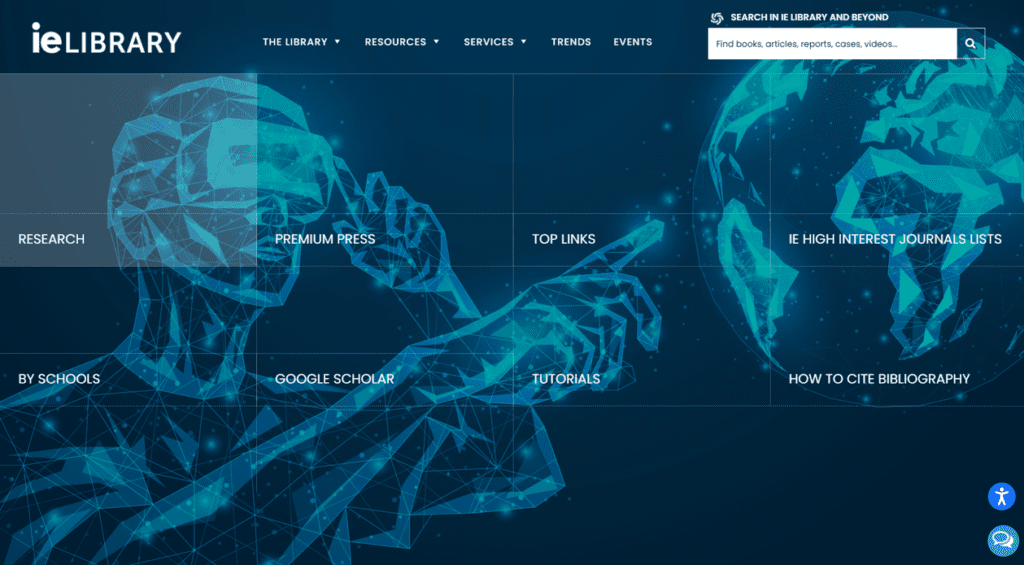
The home page is completely different from what it used to be. It is now interactive, and the design is nothing like before. You can now find the most popular resources just one click away: if you see the icon of the resource you want floating around, just click on it and you will be taken to the corresponding page. If what you are looking for is not on the home page, you will find it in the drop-down menus at the top of the page, much like how it used to function.
If the resource is not there, the user can use the search functionality in the lower-right corner of the page (the magnifying glass icon next to “Search in IE Library Website). It allows them to browse within the IE Library website in order to find content efficiently. They can search for specific sections, newspapers, publications, databases, etc.
The design of the page has gone through a complete graphic overhaul. The pages are much more colorful, and the amount of text has been reduced. An important addition is the accessibility adjustments that are now available. A small blue icon can be found in the bottom-right corner of the page. If clicked on, many customization options will appear. The user can then pick between a range of options in order to adapt it to their needs, whether it be to accommodate for slight impairments or just to make their experience more comfortable.
Much like the previous version of the page, the new one has various tabs to choose from. Two new tabs have been added: the events and trends tabs. The events tab shows all the events in which the IE library is taking part, while the trends tab shows IE Library’s involvement with the IE Community and its partnerships with academic organizations and international libraries.
If any assistance is required, the user can use the chat button below the accessibility options button in the bottom-right corner of the page. A chat window will pop up and the user is put in contact with a librarian. The user can also use new functionality, a contact form that appears in the right-hand side of most pages. Once filled in, the user will be put in contact with a librarian in order to sort out any issues.